Travelling with a baby across time zones: how to keep a feed and sleep log that still makes sense
Published 16 November 2026 · Đào Văn Thương · 6 min read
A flight across several time zones moves everything that runs by the clock: when it is light, when it is “bedtime”, when the next feed is “due”. Your baby has no idea, and for a few days feeds and sleep can look odd. A simple log does not fix jet lag, but it lets you see what is really happening instead of guessing at 3 a.m.
This guide covers what to write down, how to avoid the one confusing thing about a log kept across time zones, and what Baton: Baby Tracker does with times when your iPhone changes zone. It is general information, not medical advice: if you are worried about your baby's feeding, sleep or health on a trip, ask your pediatrician or health visitor.
This guide is general information, not medical advice. Follow what your doctor, midwife or health visitor told you, and call emergency services in an emergency.
What does jet lag look like in a baby?
Parents describe the same few things: a baby who is wide awake at what is night at the new place, sleepy in the middle of the new day, or hungry at what feels like an odd hour. How long it lasts differs from baby to baby, and you will find confident numbers online (“one day per time zone”, “three to five days”). We did not find an official AAP or NHS schedule for babies and time zones, so we do not give one here.
What you can do is watch your own baby. That is where a log helps, and it is why the notes below matter more than any rule of thumb.
What to write down on the trip
You do not need a new system. Keep logging feeds, diapers and sleep as usual, and add a few things that make the days easy to read afterwards:
- A note on the day you travel (“flew London to New York, +5 h”), so a strange day has an explanation.
- The time your baby wakes each morning, and the length of each nap, on local time.
- The longest stretch of night sleep, and any long wake-ups in the night.
- Whether feeds and wet diapers look like a normal day for your baby. If they do not, that is something to raise with a doctor, not to solve with a log.
After a few days, look for the trend: are wake-ups moving towards local morning? That is the part you want to see, and it is hard to judge from memory when everyone is tired.
The confusing thing: home time or local time?
If you keep a log on a phone, the times it shows follow the clock the phone is set to. When your phone changes time zone, a feed you logged at “14:00” at home is shown as, say, 09:00 the same afternoon in New York. Nothing is lost; it is the same moment shown on a different clock. But it can look like the log has jumped, and your partner at home sees different times from you on the same entries.
Pick one habit and keep to it. Most parents find it simplest to read everything in local time while away, and to write home time in a note on the first day or two if a relative at home wants to compare. Do not edit entries to “fix” them to home time. That would make the log say something that did not happen.
Make sure your iPhone has changed zone
On an iPhone, the time zone updates by itself if Settings, General, Date & Time, Set Automatically is on. Setting the time zone automatically also relies on Location Services; the exact switches are in Settings, Privacy & Security, Location Services, System Services, and where they sit can change between iOS versions, so check your own phone. Some people turn the automatic zone off on purpose on a flight; if you did, change it by hand at the other end, or your log, alarms and widgets will be hours out.
In Airplane Mode the phone often learns the new zone only when it is back on a network, so look at the clock after you land before you log the first feed.
How Baton handles a change of time zone
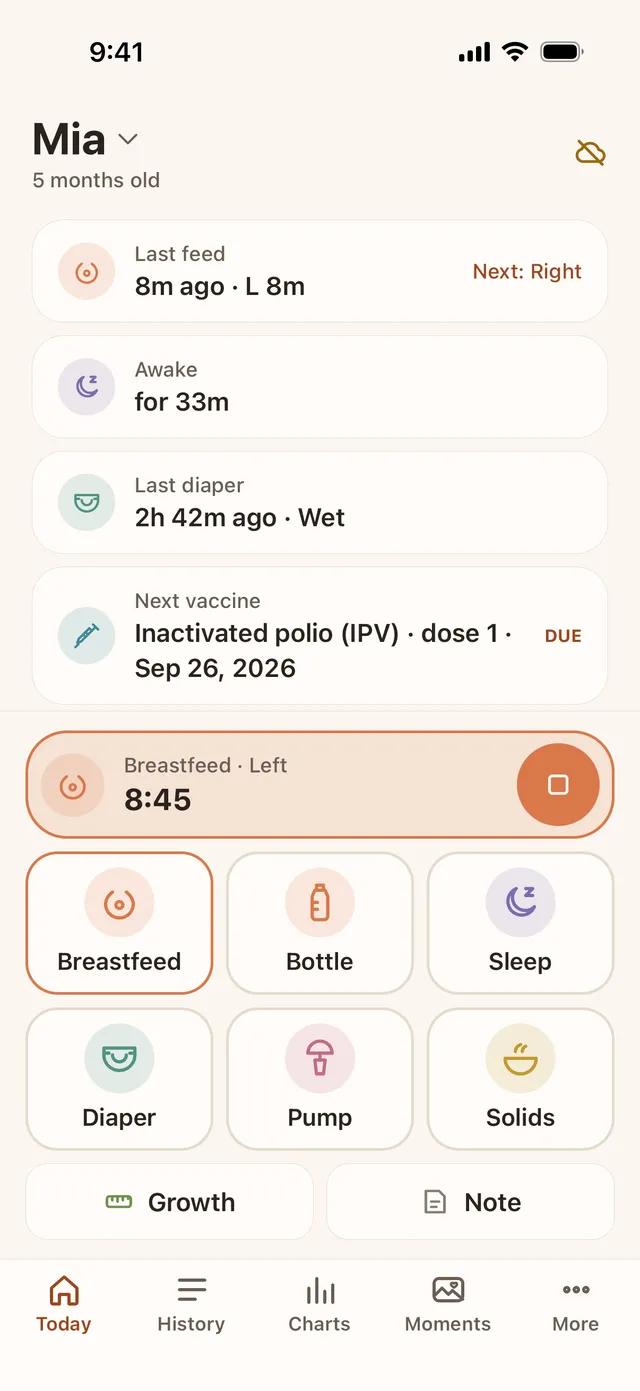
Baton stores every entry's time as an absolute moment (UTC), the same way it handles the clock change. A sleep that runs across the flight keeps its real length, and an entry never moves in real time when your phone changes zone; only the clock it is shown on changes. Baton shows times on your phone's current time zone and has no second “home time” display, so if you want one, write it in the entry's note.
Day totals and charts are cut at local midnight on the phone's current zone. On the day you cross zones, a day can therefore cover more or fewer than 24 real hours, so do not read much into that one total. Compare the days either side. A sleep that starts between 19:00 and 05:59 on the phone's clock is counted as night sleep, and night mode starts at the times you set, so both follow the new local clock after you land.
The Awake card on Today counts elapsed time since the last wake-up, so it stays correct through the change. Baton Plus's feed reminder counts hours from the last logged feed rather than a clock time. The Next nap window in Baton Plus is a suggestion from published age ranges and the app does not adjust it for travel, so treat it as a rough guide. Baton only records what you enter. It does not tell you how your baby's sleep should look.
Logging in the air, and sharing with a partner
Baton saves each entry on your iPhone first, so logging in flight mode works. Entries reach your partner through your own iCloud when you have a connection; our offline-logging guide explains what waits for sync and how to check nothing is missing.
Each of you sees times on your own phone's clock. If one parent flies ahead and the other stays home, expect the same feed to show at different clock times on the two phones. That is normal.
Safe sleep away from home
A hotel cot or a borrowed bed is a new sleep space, and the safe-sleep basics from the AAP do not change on holiday: baby on their back, on a firm, flat surface made for infant sleep, with nothing soft in the sleep space. If you are unsure about a particular cot or about your baby's breathing or feeding on the trip, ask your pediatrician before you go, or call a doctor or the emergency number if you are worried.
Frequently asked questions
- How long does it take a baby to get over jet lag?
- It varies from baby to baby, and we found no official AAP or NHS figure. Online advice ranges from a few days to about two weeks. A log of wake-up times and naps on local time shows whether your baby is moving towards the new clock. Ask your pediatrician if you are worried.
- Does a baby tracker adjust for time zones?
- It should store real moments and show them on the phone's clock. Baton stores each entry as an absolute moment (UTC), so a feed or sleep keeps its real time and length when your iPhone changes zone, and the times are shown on the new local clock.
- Why do my logged times look different after I landed?
- Because your phone now shows the same moments on the new time zone's clock. The feed did not move; the clock did. Do not edit the entries to match home time.
- Can I see home time and local time at once in Baton?
- No. Baton shows times on your phone's current time zone only. If you want home time, write it in the entry's note.
- Does Baton work on a flight?
- Yes. Entries are saved on your iPhone first, so logging works in Airplane Mode. Sharing with a partner through iCloud catches up when you are back online.