Baby tracker that works offline: how to keep logging with no signal or Wi-Fi
Published 14 November 2026 · Đào Văn Thương · 4 min read
A baby tracker that works offline saves every entry on your phone first and treats syncing as something that happens later. That matters in more places than you might expect: a hospital ward with poor reception, a long car ride, a flight, a grandparent's house with no Wi-Fi, or just a bad night when the router is down.
This guide explains what to look for, a two-minute test you can run on any tracker, and exactly how Baton: Baby Tracker behaves with no connection, based on what the app does today. It also says what offline cannot do, because two parents sharing one log do need a connection at some point.
What does “works offline” actually mean?
Store listings use the phrase loosely. These are the three questions that decide whether a tracker is really usable with no signal:
- Can you log, start timers and edit entries with the connection off, from the first launch, without signing in first?
- Does the history stay on the phone, so you can open it and read it back with no connection?
- When the connection returns, does it send what you logged, instead of asking you to enter it again?
If an app needs an account before it lets you log, or shows a spinner when it cannot reach a server, the answer to the first question is no.
A two-minute test before you need it
Try this with any baby tracker, ideally before the birth:
- 1Turn on airplane mode, with Wi-Fi off too.
- 2Force-quit the app and open it again.
- 3Log a feed, a diaper and a sleep, start a timer and stop it, and edit one time.
- 4Open the history and check all of it is still there.
- 5Turn the connection back on, open the app, and look for a sync or status message.
If any step fails or asks for a login, you have learned something useful while it is still cheap to switch.
How does Baton behave with no connection?
Baton keeps your log on the phone first. There is no Baton account or sign-in, so there is nothing to log in to, and the free logging features do not depend on a server of ours: we do not run one. Feeds, sleep, diapers, notes, timers, history and the CSV export all work with airplane mode on. Baton's own text for this state says “Everything is saved on this iPhone and its widgets.”
When you do share the log with a partner, Baton syncs through your own iCloud. If iCloud cannot be reached, the Partner & sync screen shows “Waiting for iCloud” and says “Entries are saved here and will sync later.” If you are signed out of iCloud it shows “iCloud is off” and says Baton keeps working on this phone. If iCloud storage is full it says entries wait on the phone until there is space. In every one of these states you can still log.
Baton's sleep sounds are generated on the iPhone, so they also play without a connection. Things that talk to Apple's servers, such as buying Baton Plus, do need one.
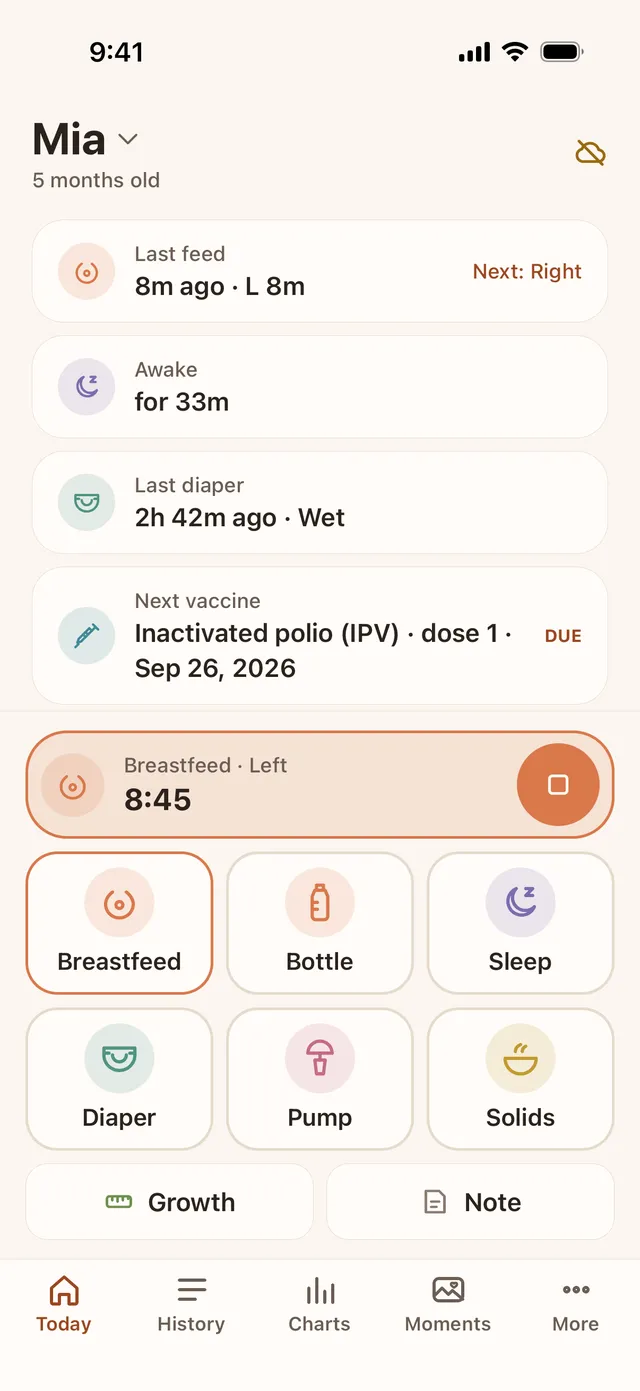
What happens when the connection comes back?
If you share the log, your entries go up to iCloud when the phone can reach it, and your partner's entries come down. Baton says that sync is usually a few seconds with both apps open, and that in the background iOS decides when Baton may wake, so an entry can wait until the next time someone opens the app. That is the honest limit of any sync that has no server of its own to push messages.
The Partner & sync screen shows “Last synced” and a Sync now button. Open Baton on both phones after you are back online and compare the last feed before you trust a handover. If the two phones disagree, open both and tap Sync now; if the status shows “Sync problem”, Baton says entries are saved on the phone and will be retried.
Syncing between two Apple IDs depends on iCloud and on both people having iCloud Drive turned on and iOS 17 or later. It is new, and Baton's own test script for two phones has not yet been run end to end, so for anything important, such as a medicine time, also say it out loud or write it down.
Tips for hospital stays, trips and patchy places
- Install and open the app at home, so it is ready and your baby is set up before you leave.
- Keep logging the same way offline as online. There is nothing to switch on.
- Do not sign out of iCloud or delete the app while entries are waiting to sync. Open it once with a connection first.
- Export a CSV now and then if you want a copy outside the app; it is free.
- If you only use one phone, none of this waiting applies: everything is simply on the phone.
For the Lock Screen and Siri shortcuts that make logging quick at night, see our hands-free logging guide.
Frequently asked questions
- Does Baton work without internet?
- Yes. Logging, timers, history and CSV export work with no connection, and there is no Baton account to sign in to. Syncing with a partner happens through iCloud when the phone can reach it.
- Will my entries be lost if I log offline?
- They are saved on your iPhone first. If you share the log, Baton shows “Waiting for iCloud” and keeps them to sync later. Avoid deleting the app or signing out of iCloud before they have synced.
- Do I need Wi-Fi to share the log with my partner?
- Sharing uses iCloud, so each phone needs a connection, Wi-Fi or mobile data, some of the time. Neither needs one at the moment of logging.
- Do I need an account to use Baton?
- No. Baton has no sign-in. Partner sync uses the iCloud account each person is already signed in to on their iPhone.