How to export your baby's feeding and sleep log as a PDF or spreadsheet for the doctor
Published 12 October 2026 · Đào Văn Thương · 6 min read
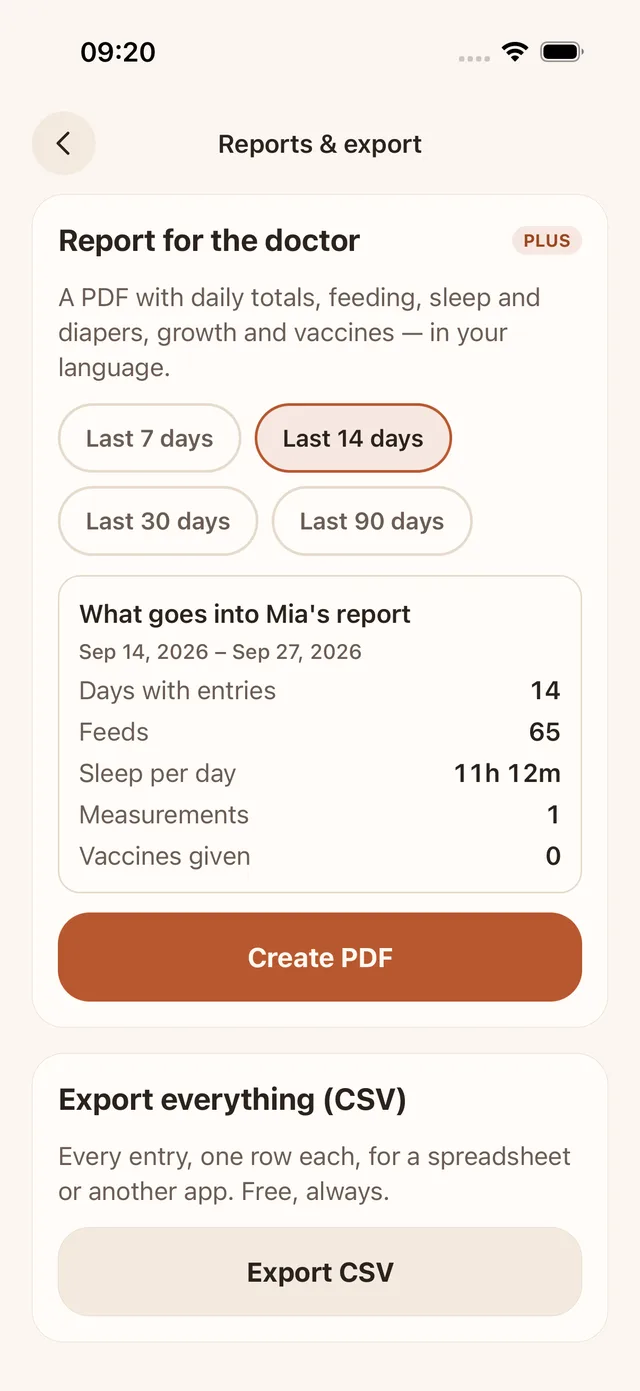
To export a baby's feeding and sleep log for the doctor, choose one of two formats. A PDF is a short, readable summary (daily totals, averages, growth) that you can print or send. A CSV is a plain spreadsheet file with one row per entry, which you can sort or hand to another app. In Baton: Baby Tracker both are in More › Reports & export: the CSV is free, and the PDF report is a Baton Plus feature.
Nobody at a short appointment can read 400 lines of notes. This guide explains what is worth sending, how to choose the date range, how to export from Baton, and what to do if your log is on paper or in another app.
This guide is general information, not medical advice. Follow what your doctor, midwife or health visitor told you, and call emergency services in an emergency.
Which format should I send: PDF or spreadsheet?
- PDF: best for a person. It fits a page or two, looks the same on every device, and can be printed or opened from an email. Choose it when you want the doctor to see the pattern at a glance.
- CSV (spreadsheet): best for data. Every entry is a row, so you can sort by kind, add up a column or build a chart in Numbers, Excel or Google Sheets. Most clinics will not want it, but it is the right file for moving your history to another app or keeping your own backup.
- Paper or a screenshot: fine too. A photo of a handwritten log, or a screenshot of one day, is often more welcome than a file the clinic cannot open.
If you are not sure, ask the clinic what it accepts: an email address, a patient portal upload, or paper at the visit. Many only take what you bring in your hand.
What should be in a log you hand to a doctor?
Less than you think. A useful summary answers the questions a doctor or health visitor usually asks:
- How often the baby feeds, and for a bottle how much, over a period of days rather than one day.
- How long the baby sleeps in total and the longest stretch at night.
- How many wet and dirty diapers a day.
- Weight, length and head measurements with their dates.
- Vaccines given, and any medicine or temperature readings if there was an illness.
- Your own questions, written separately. A log shows what happened; it does not replace the conversation.
A log records what you noticed and typed, and averages hide the odd day. The numbers are for the doctor to interpret, so add a line about anything that worried you.
How do I choose the date range?
Pick the window that matches the question. A week or two is usually right for a routine check-up or a worry about feeding or sleep. For a longer question, such as growth, a month or more shows the trend. Ask the clinic if they have a preference, and send fewer days rather than more: a recent, complete week is more useful than three months of gaps.
In Baton the PDF offers the last 7, 14, 30 or 90 days, today included.
How do I create a PDF report in Baton?
- 1Open More › Reports & export.
- 2In Report for the doctor, tap a range: Last 7 days, 14, 30 or 90.
- 3Check the preview card, which shows the dates, how many days have entries, the number of feeds, sleep per day, measurements and vaccines given. If a number looks wrong, fix the entries in History before you create the file.
- 4Tap Create PDF. The file is made on your iPhone and the share sheet opens, so you can send it by Mail or Messages, AirDrop it, or save it to Files and print it from there.
The report is written in your app's language. It holds a summary of daily averages, a day-by-day table (feeds, bottle volume, breastfeeding time, sleep, night sleep, wet and dirty diapers), growth measurements, solids with the reaction you noted, medicines, temperatures and symptoms exactly as you entered them, and the vaccines given. A line at the bottom says the values are as entered and Baton does not interpret them.
The PDF is a Baton Plus feature. You can see the preview without it, and the free app can still produce the CSV below.
How do I export everything as a CSV?
- 1Open More › Reports & export and scroll to Export everything (CSV).
- 2Tap Export CSV. The file always includes the whole history, not a date range.
- 3In the share sheet, choose Save to Files, Mail, AirDrop or an app that opens spreadsheets.
Each entry is one row, with columns such as kind, start and end time, duration, left and right minutes, amount in millilitres, diaper wet or dirty, food, weight, length, head, note and who logged it. The file is UTF-8 with the marker Excel needs, so Vietnamese names and notes open correctly. It is free, always, and the same file works for leaving Baton or for bringing the data into another tool.
A CSV opens in Numbers on an iPhone or in Excel or Google Sheets on a computer, but how it looks depends on the app you open it with.
What if my log is on paper or in another app?
- On paper: photograph each page in good light, check that the times are readable, and send the photos or bring the sheet. Write the baby's name and the dates on top.
- In another app: look in its settings for Export, Share report or Download my data, and pick PDF for the doctor or CSV for a spreadsheet. Features and plans differ by app.
If you are moving to Baton and want your history to come with you, the guide on switching baby tracker apps explains the import.
Is it safe to send my baby's log?
- The file is a copy. Sending it does not change your log, and Baton has no account to sign in to.
- Email is not private by default. If the clinic offers a patient portal, use it, and delete the attachment from chats you do not need.
- Baton creates the PDF and the CSV on your iPhone. The developer has no server and never sees them. Your log lives on your phone and in your own iCloud, and the app has no ads and does not track you.
- A family member, nanny or other caregiver can see the same log through iCloud sharing, so you can ask them to add the missing night feeds before you export.
Frequently asked questions
- How do I export my baby's feeding and sleep log from my iPhone?
- In Baton, open More › Reports & export. Create PDF makes a summary for a date range (7, 14, 30 or 90 days) and needs Baton Plus. Export CSV writes the whole history to a spreadsheet file and is free. Both open the iPhone share sheet.
- Is exporting a baby's data free in Baton?
- CSV export of every entry is free, always. The PDF report for the doctor is a Baton Plus feature, although you can see its preview first.
- How many days should I include?
- A week or two is usual for a check-up. Longer ranges help with growth. If you are unsure, ask your pediatrician's office what they would like to see.
- Does the report tell me whether my baby is healthy?
- No. It lists what you entered and gives daily averages. It does not interpret anything, so talk to your pediatrician about what the numbers mean.
- Can I print the report?
- Yes. Save the PDF to Files or open it from the share sheet in an app that can print. Printing options depend on your iOS version and printer.