Baton vs the iPhone Notes app for a baby log: which one do you need?
Published 1 October 2026 · Dao Van Thuong · 4 min read
For many families a shared note in Apple's Notes app is a perfectly good baby log: it is free, already on your iPhone, and two people can edit the same note through iCloud. A dedicated tracker such as Baton earns its place when you want one-tap logging at night, running timers, automatic totals and charts, or a clear record of who logged what.
Below is how to set up a Notes log that works, a factual side-by-side table, and an honest answer to when Notes is enough.
How do I keep a baby log in the Notes app?
Notes can do more than people expect. A simple setup that holds up at 3 AM:
- 1Create one note called “Baby log” and pin it so it stays at the top of the list.
- 2Write one line per event, newest at the top, always starting with the time: “03:35 bottle 90 ml BM”, “03:50 diaper W”, “04:10 asleep”. Agree on the abbreviations once and write them at the top of the note.
- 3Start a new heading for each day, so totals are easy to count later.
- 4Share the note with your partner. Apple's support guide explains how to share a link that invites people to collaborate on a note in iCloud, with permission to make changes; everyone sees the latest version. Both of you need to be signed in to your Apple Account with Notes turned on in iCloud.
- 5Once a day, in daylight, count the feeds and diapers and write the totals under the day's heading.
If you prefer columns, Notes also supports simple tables and checklists, though one line per event is quicker to type with one hand.
What does Notes do well?
- It costs nothing and is already installed on every iPhone and iPad, and on a Mac.
- It is completely free-form: you can log anything, in any words, including the things no tracker has a button for.
- Real-time collaboration through iCloud, with a view of recent activity that shows who changed the note.
- It is easy to copy, print or send a section of the note before an appointment.
For a short period, a single carer, or a family that simply likes writing things down, those strengths are often all you need.
Where does a note start to struggle?
The weak points show up at night and after a few weeks, not on day one:
- Typing the time, the side and the amount with one hand while holding a baby is slow, and easy to skip.
- There is no timer. For breastfeeding or sleep you end up switching to the Clock app and back.
- Totals, averages and “how long since the last feed?” are mental arithmetic, done when you are least able to do it.
- A long note becomes hard to scan. After a month, finding last Tuesday's pattern means scrolling.
- Free text cannot be turned into a chart, so a slow change over two weeks is hard to see.
None of these make Notes wrong. They are the moments a purpose-built log was designed for.
How do Baton and Notes compare, side by side?
The table lists what each one does today. Baton is an iPhone and iPad app that is not yet on the App Store; everything listed for it is in the current build.
| Apple Notes | Baton | |
|---|---|---|
| Cost | Free, built in | Core free forever; optional Baton Plus |
| Setup | Nothing to install | Install the app, add the baby |
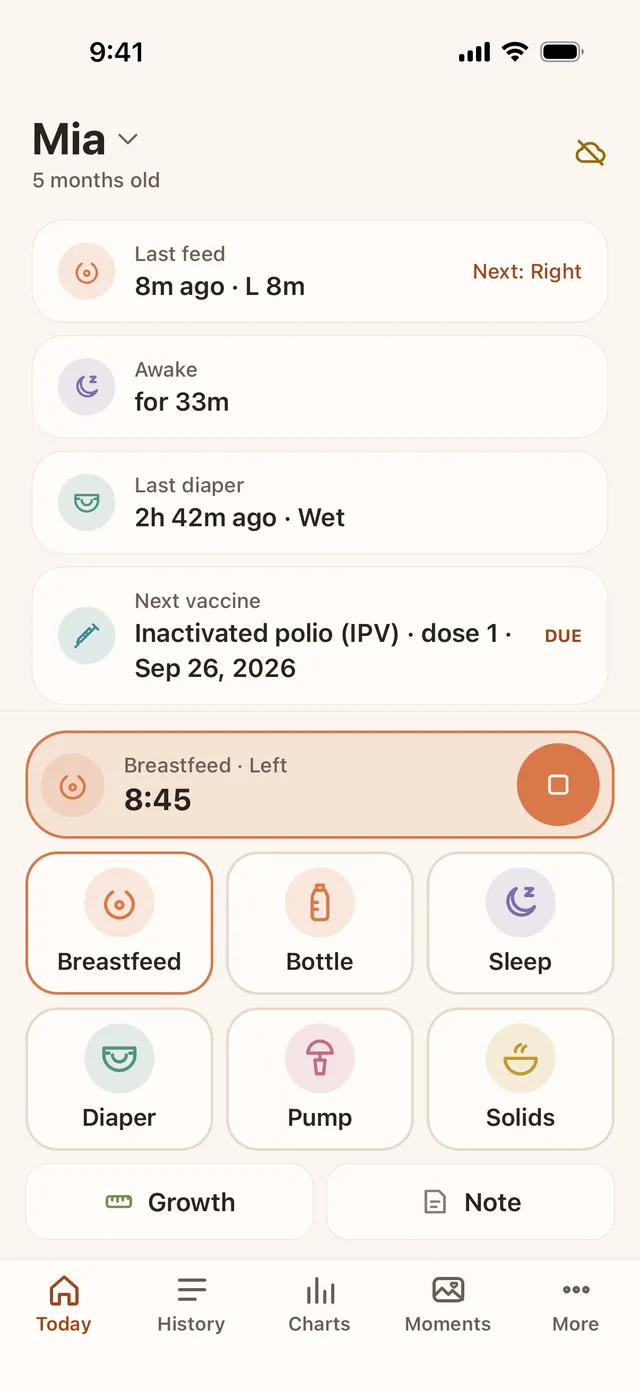
| Logging a feed | Type the time and details | One tap on a big button; time editable |
| Forgot to start? | Type an earlier time | Start a feed or sleep 5–30 min ago |
| Timers | None (use the Clock app) | Breastfeed and sleep timers, on the Lock Screen |
| Totals and charts | Count by hand | Daily totals; 7-day charts free |
| Two parents | Shared iCloud note, edit together | Shared log via each parent's own iCloud |
| Grandparents | Share with view or edit permission | Edit or view-only invitation |
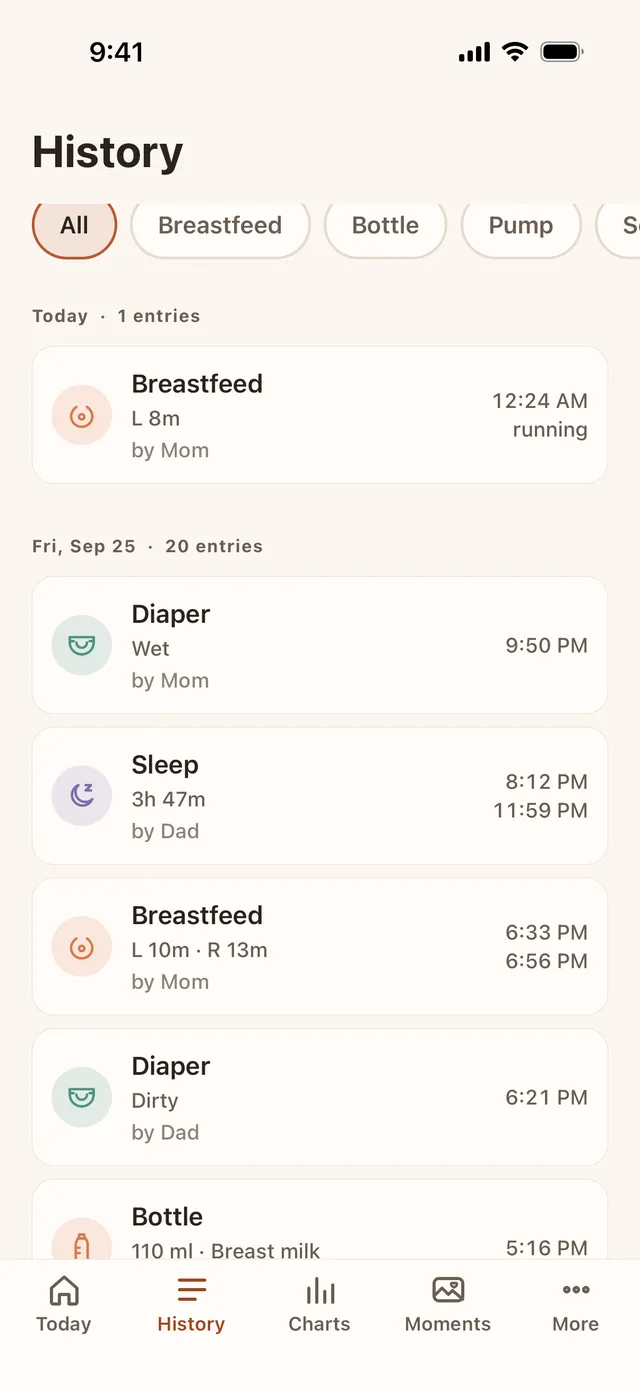
| Who logged what | Note activity shows who edited | Every entry names who logged it |
| Getting it out | Copy, print or send the note | CSV export free; PDF report with Plus |
| Devices | iPhone, iPad, Mac | iPhone and iPad (iOS 17 or later) |
When is Notes enough?
Stay with Notes if most of these are true:
- You log only a few things, or only for the first weeks until the first check-ups are done.
- One person does most of the logging, or both of you are happy typing.
- You do not need timers or charts, and your doctor has not asked you to track anything closely.
- You like writing in your own words more than tapping buttons.
Consider a dedicated log if night feeds keep going unrecorded, if you and your partner keep asking each other “when did she last eat?”, or if your care team asks for patterns over days rather than single events. You can also start in Notes and move later; nothing is lost by beginning with the simplest tool.
Where Baton helps
Baton keeps the parts of a note that matter — one shared record, written by both parents — and removes the typing. Breastfeed, Bottle, Sleep, Diaper, Pump and Solids are big buttons in the bottom half of the screen; every save has a 5-second Undo; every time can be edited; and timers run on the Lock Screen and in the Dynamic Island. Today shows the last feed, sleep and diaper at a glance, and History lists each entry with who logged it.
Each parent uses their own Apple ID and iCloud; the developer runs no server and cannot see your log, and there is no account, no ads and no analytics. The core — all logging, timers, widgets, partner sync, full history, 7-day charts and CSV export — is free forever.